I Designed Rovo Agents for Confluence

How I turned documentation strategy into agent design
I recently had the opportunity to move from thinking about AI for documentation to actually designing documentation agents.
The context was a large Confluence knowledge base covering technical and product documentation for Marketing Mix Modeling (MMM). Its users included Data Scientists, Data Engineers and consultants working across Data, Modeling, Insights and Simulations.
As often happens in my freelance assignments, I was entering a domain I did not know yet. Before thinking about AI, I first had to understand the business domain, the documentation ecosystem, its authors and its users.
That is part of the job.
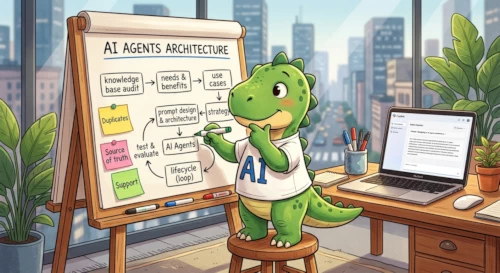
When you work on documentation built over time in collaborative platforms such as Confluence, Notion or SharePoint, you often find successive layers of content created by different teams and authors. Old pages remain accessible. Similar topics are documented in different places. Terminology evolves. What is obvious to one team is not necessarily obvious to another.
And because authors already know the product and its context, they can unconsciously compensate for gaps in the documentation. A reader who does not share that background cannot.
In this mission, that created a double challenge.
- The first audience was internal: the authors of the knowledge base and the consultants already using it.
- The second was external: consultants working with clients, who needed to understand and use this knowledge without necessarily benefiting from the same context or training.
The documentation contained a great deal of expertise, but part of that expertise was difficult to use outside the teams that had produced it.
The agents were directly connected to the problems and recommendations previously identified in the audit.
Four documentation services emerged from that work:
- a Documentation Intelligence Assistant, to retrieve, compare and synthesize technical information;
- a Documentation Duplicate Finder, to identify overlaps, duplicates and inconsistencies;
- a Glossary Intelligence Agent, to clarify terminology, acronyms and variants;
- a User Adoption & Support Assistant, for onboarding, procedures and support questions.
I also designed an orchestrator intended to provide a single entry point and route requests to the appropriate specialist.
I Did not Start with an Agent
One of my strongest conclusions from this experiment is simple:
The agent should not precede the need.
Each of the four agents came from a problem I had already identified in the documentation.
-
Finding and combining information was difficult? → That suggested a retrieval and synthesis service.
-
Duplicated or overlapping content made maintenance harder? → That suggested an analysis service.
-
Terminology varied between teams and pages? → That suggested a glossary service.
Support was another issue.
Some FAQ pages were too poor or poorly written to answer users' real questions, while the support team kept receiving tickets without those recurring issues systematically feeding back into the documentation. That suggested a support service — but also a way to expose gaps that the documentation itself needed to address.
One problem, one specialized service.
Instead of treating agent creation as another AI trend to follow, or trying to build one impressive assistant capable of doing everything, I was defining documentation services first and choosing the technology afterwards.
The technology followed the documentation strategy — not the other way around.
Prompt Design is Documentation Design
This was where my documentation expertise mattered most.
Rovo Studio gave me the environment in which to configure the agents. Copilot, available in the client's Microsoft 365 environment, became my design partner.
I used it much as I use AI in other parts of my work: to question myself, clarify instructions, formalize roles and scopes, refine expected outputs and test prompts, and imagine boundary cases that could make the scope and out-of-scope more precise or expose weaknesses in an agent's behavior.
The result was a three-way collaboration between documentation expertise, Rovo Studio and Copilot.
But the documentation expertise remained what made the agents specific.
A generic agent can be configured quickly. A useful custom agent has to be adapted to the knowledge base it will navigate: its content, structure, terminology, users, weaknesses and governance rules.
This is where documentation issues and best practices became prompt directives.
Rules that were weak, implicit or missing in the documentation could be made explicit in the prompt. The prompt gave them a concrete form and turned them into expected agent behavior.
In that sense, documentation governance questions are also agent design questions.
What Worked Well
Once I knew precisely what I wanted each agent to do, I found Rovo Studio relatively straightforward to use.
➕ The native integration with Confluence was obviously a major advantage.
I was working directly with the knowledge environment the agents were supposed to explore, without having to solve a separate access problem first.
I was also pleasantly surprised by how well the agents followed detailed prompts.
They were able to return structured outputs, combine information from several pages and work with the technical context I had defined for them.
The experimentation loop was also quite enjoyable.
Write the prompt. Test it. Find a weak point. Refine a rule. Try another question. Discover that the answer reveals something about the documentation itself. Go back to the prompt.
I did not feel that I was simply "configuring an AI".
I was progressively specifying a documentation service. And that was probably the part I enjoyed most.
A few Practical Hurdles
Of course, good specifications do not remove every practical constraint.
The main one concerned the orchestrator.
I had designed it as a single entry point able to route requests to the four specialized agents and return one consolidated response.
➖ But Rovo Studio does not have an "orchestrator" as such. The idea was to build a higher-level agent that could call the four specialized agents as Tools, but my environment did not give me the permissions required to configure that setup.
➖ I encountered a similar limitation with Insights. The feature could provide usage metrics, but my Confluence permissions and the duration of the assignment did not allow me to observe the agents long enough to draw meaningful conclusions about adoption.
There was also a very practical timing issue: some colleagues really started using the agents after my assignment had ended.
That is one of the limitations of a short freelance mission. You can design, configure and test a service, but you may leave before its real usage patterns emerge.
None of these were failures of the agents themselves.
They were useful reminders that agent design also depends on the environment in which the agent will live: permissions, integrations, access rights, deployment conditions and time available for observation.
I Experimented with a Confidence Score
One feature I added experimentally to some outputs was a confidence score.
The intention was simple.
When an agent combines several sources, encounters incomplete documentation or has to choose between information of different quality, I wanted the user to have some indication of how cautiously the answer should be interpreted.
I also liked the idea that such a signal could indirectly highlight weak areas of the documentation.
If an agent repeatedly produces low-confidence answers around the same subject, perhaps the problem is not only the agent. Perhaps the underlying documentation needs clarification, consolidation or a clearer source of truth.
But there is an important caveat.
This was an experiment, not a scientific measurement.
The score was not an objective probability that the answer was correct.
It was a signal.
And numerical signals are dangerous because they can easily look more precise than the method behind them really is.
I would definitely explore this idea again, but with that limitation made very explicit.
Would I Do it Again?
Yes.
I genuinely enjoyed designing these agents.
What interested me most was not the novelty of using Rovo Studio.
It was the possibility of taking everything I already use in documentation work — architecture, terminology, governance, audience analysis, source quality, information retrieval — and translating it into agent behavior.
I would like to design more of them, on other knowledge bases and in other environments.
And I also want to extend this work beyond collaborative knowledge platforms such as Confluence.
Documentation websites are an obvious next field of experimentation for me. 😊
I already work with docs-as-code websites, structured content, metadata and AI-ready documentation. Designing agents that can interact with those documentation systems feels like a natural continuation of that work.
The tools will change.
The platforms will change.
But the underlying work remains surprisingly familiar: understand the knowledge, structure it, qualify it, and design the best possible way for users — human or machine — to access it.
P.S. Thank you, E., for the opportunity!