How I Took Control of My Metadata

How I used structured data to control my digital identity
In a world where everything is data — our photos, documents, publications, websites — metadata has become a major strategic asset.
Search engines, generative engines, ATS platforms, freelance marketplaces, AI systems... they all read metadata before they read content.
Metadata therefore directly influences how search engines, generative engines, ATS, AI systems, and even internal tools interpret your content.
It has effectively become a form of digital identity, a semantic passport.
Unlike a PDF* or a static knowledge base, a website offers a decisive advantage: you can write your own metadata — and therefore control it.

For a small company like mine, carefully defining metadata is critical. Visibility no longer depends solely on traditional SEO, but also on GEO — the ability to be understood, cited, and reused by generative engines.
I also wanted to lock down my digital identity before someone else defined it for me.
That's where structured data comes into play. It's not there to "look nice." It's there to describe, connect, and contextualize.
And most importantly: it speaks to machines in their own language.
* PDF metadata is inherited from the source document. This is why it is highly recommended to properly fill in metadata in tools like Word before exporting.
Why Structured Data Matters Today
Structured data allows you to precisely describe a web page for machines. It is defined by the schema.org vocabulary and embedded in pages using formats such as JSON-LD, which is recommended by Google.
A Critical Role
Structured data helps to:
-
Clarify semantics: machines better understand context, entities, and relationships.
-
Strengthen brand consistency: you control how your company, product, or personal brand is described.
-
Improve information security: you decide what circulates in global data lakes.
-
Optimize SEO + GEO: generative engines appear to rely on these signals when available.
Core Entities
Even though Google does not explicitly require it, its documentation strongly recommends that any professional website declares at least the following entities:
WebSiteOrganization
For personal brands or authors, you can also add a Person entity to reinforce E-E-A-T* — the more clearly you are recognized as an expert, the more likely generative engines are to cite you.
- Experience, Expertise, Authoritativeness, and Trustworthiness
JSON-LD: The Recommended Format
JSON-LD: JavaScript Object Notation for Linked Data
JSON-LD is a lightweight format that allows structured data to be injected into the <head> of an HTML page.
It offers:
- simple syntax,
- a clean separation between content and metadata,
- optimal compatibility with Google.
Types and Properties: Prioritize Quality
Google only supports a subset of the schema.org vocabulary.
It is better to select fewer properties, but make them relevant, coherent, and complete.
Google explicitly warns that using an inappropriate schema may cause the entire JSON-LD graph to be ignored — especially in cases of semantic misclassification.
In my case, I complemented the core entities (WebSite, Organization and Person) with structured definitions for the author, publisher, pages, and blog posts.
I deliberately excluded the Speakable property (intended for US users with English-configured Google Home devices), as it was not relevant to my use case.
Be Precise and Descriptive
Descriptive properties are essential for GEO:
- rich descriptions,
- natural keywords,
- images,
- dates,
- canonical URLs,
- and identifiers (
@id).
They reinforce machine understanding and overall site coherence.
👩💻
Small challenge: be both precise and descriptive within a controlled character count — without keyword stuffing, while still being inventive.
Example
Below is the structured definition of the site author for CoffeeCup.tech, including all relevant properties:
"author": {
  "@type": "Person",
  "name": "Florence Venisse",
  "givenName": "Florence",
  "familyName": "Venisse",
  "jobTitle": "Expert Technical Writer",
  "url": "https://coffeecup.tech/about/",
  "image": "https://coffeecup.tech/img/Florence_CoffeeCup.tech10.png",
  "description": "Florence Venisse is a technical writer with more than 20 years of experience in software documentation xxxxxx.",
  "worksFor": "Coffee.Cup.tech",
  "sameAs": "https://www.linkedin.com/in/florencevenisse/",
  "knowsAbout": [
    "technical writing",
    (...)
  ]
}
Injecting Structured Data into Docusaurus
Good to know: Docusaurus automatically injects a BreadcrumbList into the HTML <head>, as well as hreflang tags if i18n is enabled.

Docusaurus' customization capabilities allow you to complement these defaults with your own schemas.
Two approaches are possible.
Global Injection via docusaurus.config.js
This file defines most global site behavior (otherwise it lives in src 😁). It is a logical place to inject JSON-LD — especially when it only contains a few core entities.
- Pros: simple and centralized.
- Limitation: the same JSON-LD is injected everywhere, even on pages that require specific schemas.
Page-Level Injection via a React Component
The alternative is page-by-page injection using a React component (Root.js).
This is the approach I chose.
My website contains many pages, and repeating a generic, minimal schema everywhere did not align with my goals.
This method allows:
- centralized code management (single file),
- scalability (new page = new entry),
- page-specific markup,
- consistent SEO + GEO.
It's a clean, maintainable architecture, perfectly suited to documentation websites.
Example
Here is the beginning and end of my Root.js file:
// src/theme/Root.js
import React from 'react';
import { useLocation } from '@docusaurus/router';

export default function Root({ children }) {
  const location = useLocation();

  const schemas = {
    '/': {
      "@context": "https://schema.org",
      "@graph": [
        {
          "@type": "Organization",
          "@id": "https://coffeecup.tech/#organization",
          "name": "CoffeeCup.tech",
          "legalName": "Florence Venisse EI",
          "legalRepresentative": {
            "@id": "https://coffeecup.tech/#person"
          },
          "location": "France",
          "url": "https://coffeecup.tech/",
          "logo": "https://coffeecup.tech/img/logo/coffeecup_logo_small.webp",
          "description": "CoffeeCup.tech provides expert technical writing, API and SDK documentation, docs-as-code xxxxxx",
          "sameAs": "https://www.linkedin.com/in/florencevenisse/",
          "founder": { "@id": "https://coffeecup.tech/#person" }
        }
      ]
    }
  };

  const schema = schemas[location.pathname];

  return (
    <>
      {children}
      {schema && (
        <script type="application/ld+json">
          {JSON.stringify(schema)}
        </script>
      )}
    </>
  );
}
👩💻
In total, this JSON-LD file contains 2,799 lines — for one language only (English). My site is bilingual (EN/FR): a small teaser for method #3, which replaced method #2 and will be covered in my next blog post.
Validation: A Mandatory Step
I spent a lot of time using validation tools:
-
Google's Rich Results Test
-
The schema.org Validator
Google strongly recommends systematically testing structured data.
I validated each block individually, then the entire graph.
This helps detect:
- inconsistencies,
- deprecated properties,
- syntax errors,
- schema conflicts.
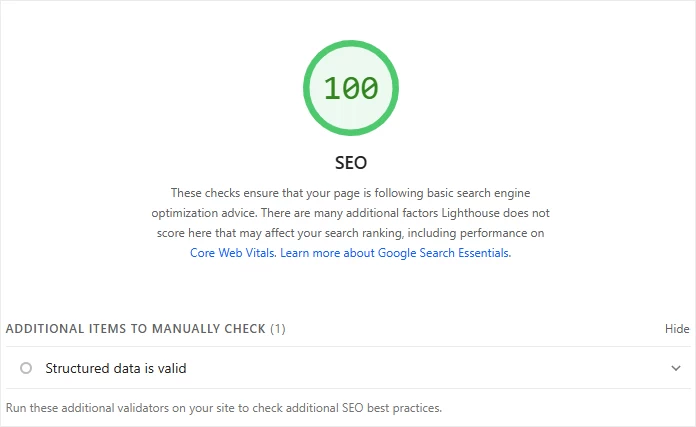
Ultimately, we're happy when Google PageSpeed Insights validates your work:
Structured Data and Documentation Sites
It's easy to assume a documentation site doesn't need all this.
That it simply needs to contain information about the product and be usable by users.
But a documentation site is more than that: it is a source of truth for the product and a core communication asset — internal or external.
Website with Restricted Access
Even if the site is not indexed, structured data is still useful:
- for internal LLMs,
- private chatbots,
- automated agents consuming HTML.
Provided, of course, they have access to the content.
Public Documentation Website
A documentation site contributes to overall brand awareness.
It becomes a data source among others, consumed by:
- search engines,
- generative engines,
- AI assistants,
- analytics tools.
Structured data strengthens:
- brand consistency,
- E-E-A-T (Experience, Expertise, Authoritativeness, and Trustworthiness),
- machine understanding,
- overall visibility.
Bonus: Best Practices
Here are a few best practices — and common mistakes to avoid:
| Do ✅ | Don't ❌ |
|---|---|
| Declare WebSite + Organization. | Add too many unnecessary properties. |
| Add Person for personal brands. | Forget @id or canonical URLs. |
| Write rich, consistent descriptions. | Describe the same entity differently across pages. |
| Inject JSON-LD per page. | Mix formats (JSON-LD + microdata). |
| Test with Google + schema.org tools. | Forget to retest regularly. |
| Ensure consistency between: – content – OpenGraph – JSON-LD – titles and body | Copy-paste schemas without adapting them. |
Conclusion
Structured data is no longer a simple SEO bonus. It has become a pillar of machine understanding, a visibility lever for generative engines, and a strategic tool for controlling your digital identity.
For small businesses, this is a real opportunity: with clean, coherent, and well-designed structured data, you can compete with much larger players.